See also : List of planned features.
General
See also : List of planned features.
The Paramaker is used differently depending on circumstances. When creating a household, access to all of its features is granted to the player. However, in Live Mode, Paras can only use it to change their make-up and outfits (as long as they have access to a mirror or dresser), while changing hairstyles requires a visit to the hair salon.
Genetic characteristics can't be modified once in Live Mode.
Customization in the Paramaker falls into three categories: Body, Clothing, and Personality. An additional interface also sets up the Para's identity.
Body
Paramaker Sliders
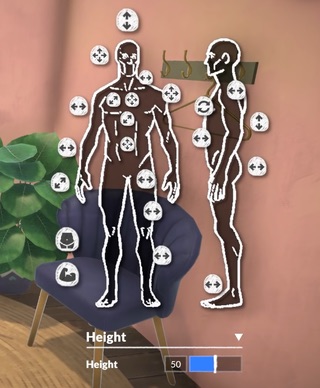
Screenshot from the Paramaker Overview (December 2021) showing the various sliders to customize the appearance of a Parafolk.
See also: Genetics.
Most physical features (though not all) decided during character creation become genetic traits that can be passed onto later generations, or used to generate a family member with similar appearance.
Body sliders
The vast majority of physical features in the Paramaker rely on sliders. By clicking on a part of the Parafolk's body, sliders appear in the righthand side of the screen to refine their appearance. Each slider can be refined in that righthand menu by pushing arrows in the desired direction, or by using numerical settings for improved precision.
Some presets are also available, as shorthand for quick character creation.
Animated image showcasing a Parafolk in the process of being created. The UI on the righthand side of the picture shows a large menu including a color wheel, 4 different areas which can each have a different color, and at the bottom, a field to type the hex color code instead of finding the shade on the wheel.
Animated capture of the options available to pick the color of the skin of a Parafolk in the Paramaker, as seen in the Paramaker Overview (December 2021)
Eye, hair and skin color
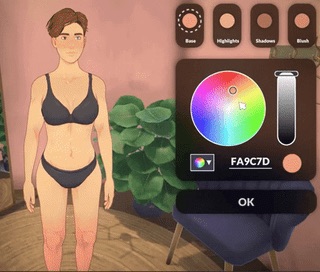
The Paramaker uses a color wheel system for physical characteristcs relying on color. Although a number of presets are available for quick use, players who wish to get into the finer details of a Para's appearance can use this system, as well as hex codes, to define an exact shade.
Eyes, hair and skin all come with different color regions, meaning that there is a main color as well as accent colors to create chromatic nuances. For example, skin color comes with "Base", "Highlights", "Shadows" and "Blush" color regions: all 4 of which can be adjusted by the player.
Gendered appearance
Parafolks don't have "masculine" or "feminine" body frames, but rather a single gender-neutral body frame that can then be customized in any way the player wishes to (for instance by adjusting the sliders for the chest, hips, buttocks and more).
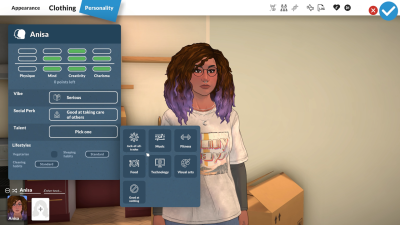
This approach allows Paralives to provide full customization, as well as opens up the clothing catalog to any Para regardless of chosen gender.
Clothing
Clothing in the Paramaker is entirely gender-neutral, meaning that any Para can wear any clothes regardless of their gender.
Some clothing items can be layered with others, such as an open jacket allowing for a variety of shirts and sweatshirts underneath it. This system requires for two pieces of clothing to be set as compatible, to avoid clipping issues. Modded clothes, in particular, must specifically encode their compatibility with other pieces.
Most clothes are available to all lifestages. One notable exception is that Baby and Toddler Paras have a separate set of clothing options. There are also some other case-by-case restrictions, such as Child Paras not being able to wear high heels.