
Bonjour à tous ! Lina ici pour mon premier post sur Patreon !

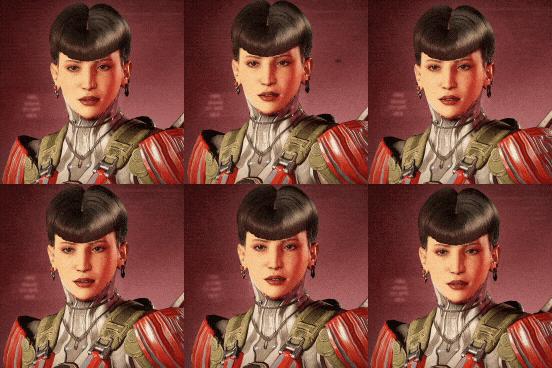
Aujourd’hui, j’aimerais vous montrer les animations qu’Alice et moi avons créées récemment ! Le thème est : Émotions !

Vous pouvez regarder la petite présentation qu’Alice a faite en haut de ce post Patreon. ⬆

Nous avons déjà partagé des animations d’émotions dans ces deux posts ici et ici. Vous en reconnaîtrez peut-être certaines ! La dernière fois, nous avions dit que nous allions commencer par les animations pour enfants, mais avec les programmeurs travaillant actuellement sur les systèmes liés aux émotions et aux personnalités, il était plus logique de changer nos priorités et de travailler d’abord sur les animations nécessaires pour ces systèmes ! Mais ne vous inquiétez pas, nous y reviendrons plus tard !
 Animations présentées dans la vidéo
Idle Heureux
Idle Heureux Variante 1
Idle Heureux Variante 2
Idle Heureux Variante 3
Idle Ennuyé
Idle Ennuyé Variante 1
Idle Ennuyé Variante 2
Idle Dégoûté
Idle Dégoûté Variante 1
Idle Dégoûté Variante 2
Idle Gêné
Idle Gêné Variante 1
Idle Gêné Variante 2
Idle Stressé
Idle Stressé Variante 1
Idle Triste
Idle Triste Variante 1
Idle Triste Variante 2
Idle En colère
Idle En colère Variante 1
Idle En colère Variante 2
La musique de la vidéo d’aujourd’hui est une version au piano de la chanson d’Andrei intitulée « Intertwined ». Si vous êtes curieux, nous l’avons partagée dans ce post ici !

 Comment fonctionneront nos Animations d’Émotions
Pour chaque émotion que votre Para ressentira, l’objectif est d’avoir plusieurs variations afin d’ajouter plus de profondeur et de vie. Alice et moi nous sommes beaucoup amusées à réfléchir à nos idées et à rechercher des références ! Plus tard, nous aimerions éventuellement ajouter un code couleur ou des effets 2D pour mieux comprendre ce que ressent votre Para ! Nous travaillons également sur de nouvelles animations pour accompagner l’ambiance de vos Parafolks, que nous présenterons dans un futur post. En attendant, voici un petit rappel sur le fonctionnement des ambiances.
Veuillez noter que la liste des émotions et tout ce qui est présenté aujourd’hui est encore en cours de développement et peut évoluer à l’avenir !
 Quoi de neuf ?
Ensuite, nous allons nous lancer dans une tâche très secrète et excitante ! C’est tout ce que je peux dire pour le moment.
 Mais voici un petit aperçu : nous avons également travaillé sur des interactions lorsque deux Parafolks deviennent intimes ! Nous partagerons plus dans de futurs posts…

C’est tout pour aujourd’hui ! Nous espérons que vous avez pris autant de plaisir à regarder nos animations que nous en avons eu à les créer !
Nous serions ravies de recevoir vos commentaires et de répondre à toutes vos questions dans la section des commentaires ci-dessous.
Passez un excellent week-end !~~


Lina

Édit – 22 mai 2025 : ce post est maintenant public, n’hésitez pas à le partager !